Secure and protect your files
LockmyDrive is a helpful application developed by SoftVit that will provide safety and protection for your files. It is very easy to install, use, and will ensure that your drives will not be accessible to other people except you.
Top Recommended Alternative

Feel safe with just a few clicks
Preventing other users of your computer to open, view, and access your files comes in quick and easy steps. It is a portable application so you do not have to worry about long installation processes. Once you are able to download LockmyDrive, all you have to do is run it and its window will pop-up on your screen, ready to be used. I find this to be a really convenient feat because it means that you can copy and use LockmyDrive to other computers easily by simply having it saved in any portable device. Having no installation process also saves a lot of time and makes things less complicated.
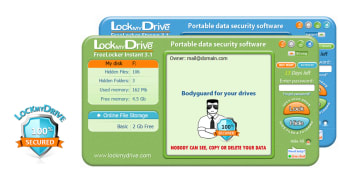
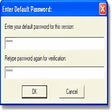
It would seem that LockmyDrive aims to live a life free of complications because the process of securing your drives is very easy. The interface of the application is simple and all the buttons you will need are displayed neatly. What you need to do is to click on the drive you would like to lock and then you will see a LockmyDrive icon along with the folders inside it. Once you click the application, its window will appear. To effectively lock your drive, input a strong password on the password bar and then click “Lock.” If you want your drive to still be accessible but have its files unavailable to others, you can highlight said files and folders while the application is launched then select the “Hide” button. Unlocking and unhiding your folders and drives will simply require you to enter your password.
Call for backup!
File security does not stop there! LockmyDrive also gives you free 2GB of storage where you can save files and folders in an online file storage. This can serve as a backup in case you accidentally delete or lose the files in your computer. You will see this option on the left side of your LockmyDrive window. Once you click on it, it will take you to its website and from there you can select and upload the files you want LockmyDrive to safe keep.
Untouchable to others
Once your drives, files, and folders are locked, they will become completely untouchable to others. For instance, locked folders cannot be opened, dragged, nor copied to other file locations in your PC. Other people will also fail to view the remaining available storage space of your locked drives! You now do not have to worry about your files being stolen or spied on. Your personal documents, photos, and videos will also be kept away from prying eyes.
Convenient and reliable
LockmyDrive is a very good application that is convenient and really easy to use. Rest assured that your files are protected and safe from other people once you have them secured using this application.